Set paragraph format in text frame
Perform format settings such as indent, line feed, line-alignment, and typesetting for the text in the text frame. Even if line feed occurs in the text of text frame, it is treated as a whole paragraph.
Prerequisite
A text frame has been placed.
Procedure
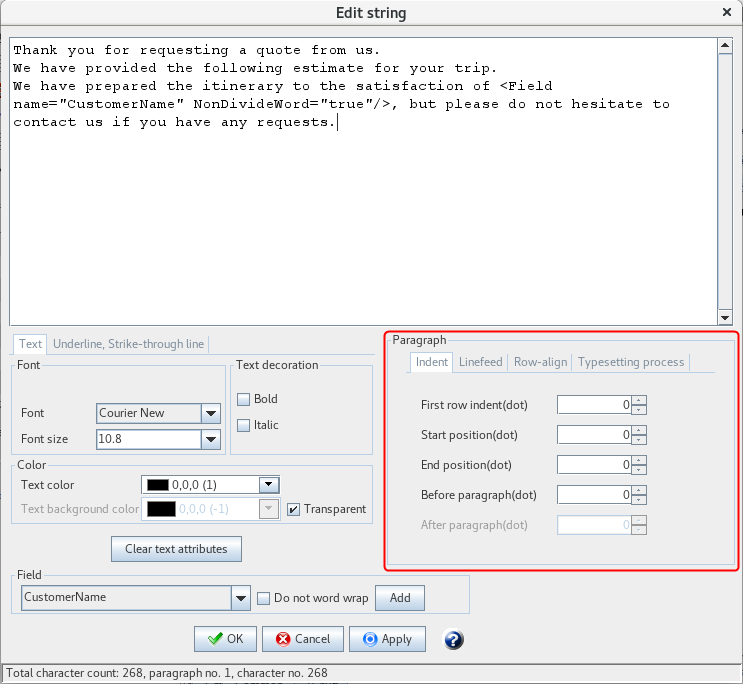
Select the text frame and click the ... button in the right edge of the String field in Property editor.
The Edit string dialog appears.
Set each item in each tab at Paragraph in the Edit string dialog.
Paragraph formats such as indent, line feed, line-alignment, and typesetting are separated with different tabs.
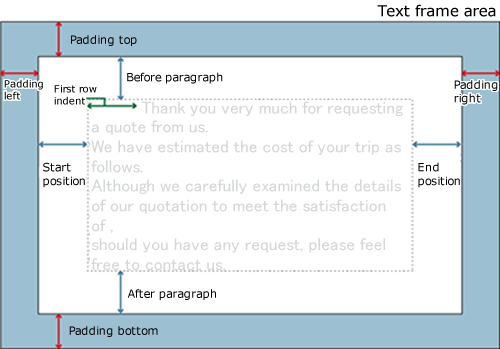
The relationship between each setting of margins and Paragraph - the Indent tab for text frame is as follows:
Reference
You can set paddings at the text frame properties.
Click the Apply button to reflect the settings to the text frame on the form without closing the Edit string dialog.
Click the OK button to close the Edit string dialog and reflect the settings to the text frame on the form.
Click the Cancel button to close the Edit string dialog and discard the settings.