Manage users who use SVF Cloud Designer
The following users need to be granted the "Launch Permission" for SVF Cloud Designer.
Use SVF Cloud Designer
Test output forms
Export and import a form layout on the Resource screen
Granting/deleting of permission must be performed by a user with system administrator permission.
Reference
Since the number of permissions is limited (the number of permissions depends on your contract), we recommend that you remove permissions from the users who no longer use SVF Cloud Designer.
For the number of SVF Cloud Designer contract licenses and how to check the current total usage count, see "Check the contract information".
Log in to SVF Cloud Manager.
Click
 Environment Settings - User.
After selecting the target user, click Details - Permission to Launch SVF Cloud Designer - Grant permission to launch or Remove permission to launch button to grant or delete permission.
Figure 1. Example of granting permission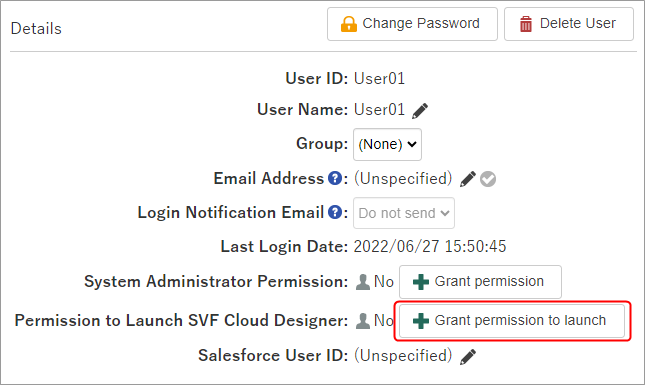
By clicking the OK button on the confirmation screen, granting/removing permission is complete.