Output images to a form
There are three ways as follows to output images to a form.
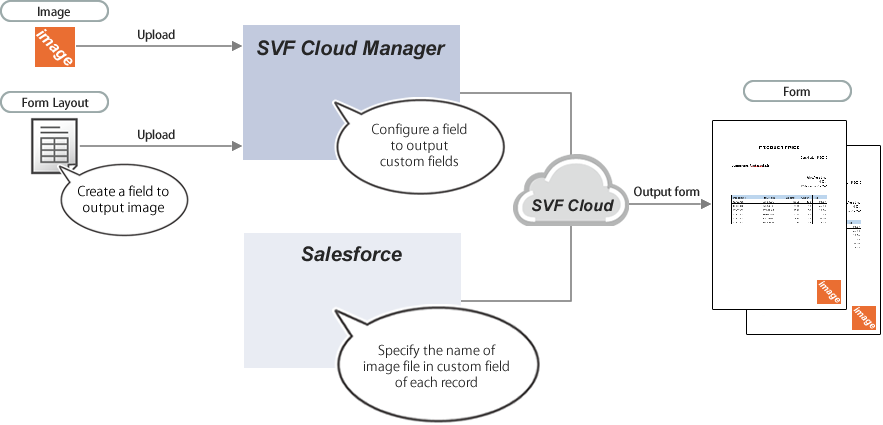
Output the same image files from more than one record
Upload the image to SVF Cloud Manager and specify the name for the image file in the custom field in the Salesforce record.
This is useful to output an image to multiple records, because you need to upload the image file only to SVF Cloud Manager instead of each record.
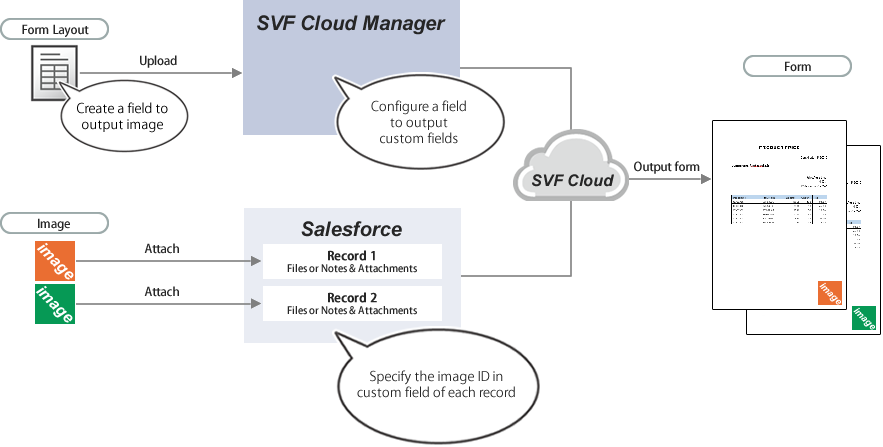
Output images attached to a record
Attach an image to Files or Notes & Attachments of the record, and specify the ID of the image in the custom field of the record.
This is useful when you want to output different images for each record.
If the image is frequently updated, we recommend using the rich text area.
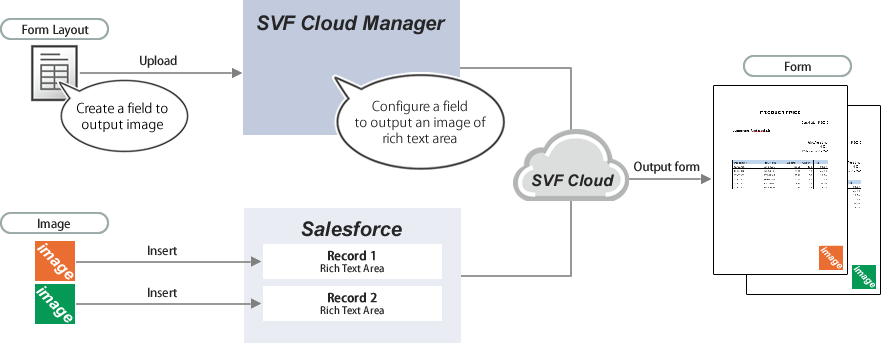
Output images inserted in a rich text area
Insert the image into the rich text area of the record.
Up to ten images can be output per rich text area.
This feature is helpful for setting output preference when images to output are different for each record and the images should be updated frequently, because output setting is easy.