Form layout of a Word file
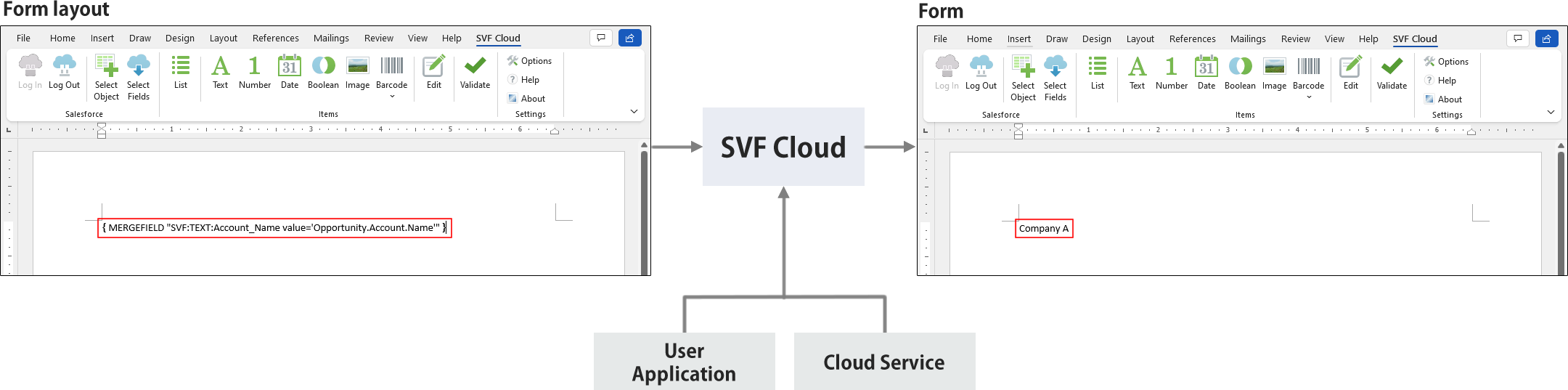
You can create a form layout by placing a "field" for outputting data on the page in Microsoft Word.
The fields contain "tags" to specify the type and format of the data to be output.

You can manually enter a tag, but you can create a form layout more easily by using the free Word add-in "Word Designer" provided by SVF Cloud that enables automatic creation of a tag. For details on Word Designer, see "Word Designer".
A form is generated by feeding data from a user application or cloud service into the created form layout.
Notes on the creation of a form layout
The form layout of a Word file supports the following formats.
Word document (*.docx)
Word macro-enabled document (*.docm)
The format settings set on a page will be reflected as they are in an output form.