Enlarge/reduce barcode
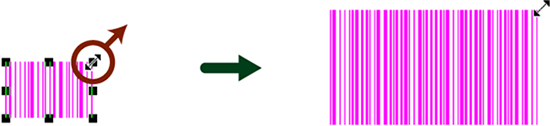
You can change the width and height of a barcode by enlarging or reducing it.
Procedure
Select a barcode.
Square handles appear around it.

Place the mouse pointer on the handle. Move the mouse pointer near a square handle at one of the four corners or sides.
The pointer changes to
 .
.
Drag the pointer in any direction.
The barcode size is enlarged or reduced.
Restriction
The number of digits cannot be changed if "JAN/EAN-13", "JAN/EAN-8", "Postal code", "CVS-EAN128" or "JAN/EAN-13 add-on 5 (JAN13 + Add-on)" is specified as the barcode type.
Reference
In Settings - Preferences - Display, when the Control width changes check box is selected for Barcode, the operation is as follows:
The number of digits will change as the width changes.
You can enlarge or reduce without changing the number of digits by holding down the Ctrl key.