Create dynamic text by referring to fields (text frame)
Text frame can create a dynamic text by making it reference other fields on a form within text and automatically embedding retrieved text to the specified field position.
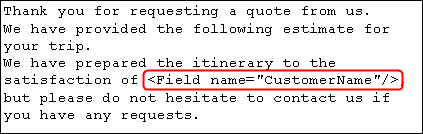
The following example describes the procedure of setting to reference the field "CustomerName" within the text.
Prerequisite
A text frame has been placed.
A field to be referenced has been created.
If you want to enable data reference but do not want to print the referenced field, use a "page mask".
Procedure
Select the text frame and click the ... button in the right edge of the String field in Property editor.
The Edit string dialog appears.
Move the pointer to the position to insert the field name in the text box of the Edit string dialog.
Click the Field column to display a list of fields that can be referenced in the text frame. Select the field name to be referenced from the list.
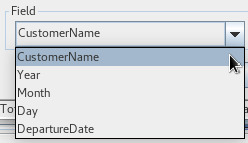
Click the Add button.
A tag string representing a link with the field is inserted at the pointer position in the text box.
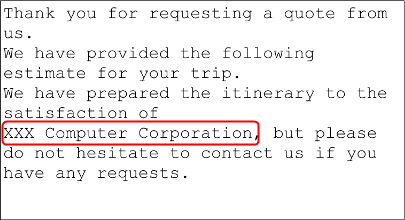
Select the Do not word wrap check box before inserting a tag string to prevent data set in the field from being spread across multiple lines when outputting the data.
If you select the Do not word wrap check box and output "XXX Computer Corporation" to the "CustomerName" field, the text string is output without being spread over multiple lines.
Reference
The Do not word wrap setting is applicable to text strings. Therefore, when you place the same field in multiple positions and Do not word wrap is enabled for one of these fields, the Do not word wrap setting is enabled for all the fields.
In addition, the Do not word wrap setting is also enabled for cases where the same text string is output from different referenced fields. The same is true for static text. If the width of the text string with the Do not word wrap setting enabled is greater than the width of the text frame, the Do not word wrap setting is ignored and the text string is segmented.
Changing the "name" of the referenced field automatically updates the name of the corresponding field embedded in the text frame.
Copying the text frame and pasting it in different XML form file will retain the tag representing the link with the field even if the referenced field does not exist in that XML form file.
After configuring all the settings, click the OK button.
The dialog closes. The inserted tag string appears in the text frame on the form.