Ellipse properties ("General" tab)
Set the properties in Property editor. Ellipse properties are grouped into the General, Fill, and Multi-page tabs.
This section describes the General tab of the ellipse properties.
Setting items in the "General" tab
Properties | Description |
|---|---|
Name | Type a name. By default, it is automatically and sequentially specified from "Oval1". You can use alphanumeric characters, Kana, Kanji, and underscores (_). Do not use a number for the first character of the name. The maximum length of the name depends on the setting in "Preferences". |
Center X(dot) | Set the X coordinate of the center point of the ellipse. |
Center Y(dot) | Set the Y coordinate of the center point of the ellipse. |
Width(dot) | Specify the width of the ellipse in dots. |
Height(dot) | Specify the height of the ellipse in dots. |
Horizontal axis angle | Specify the rotation angle of the ellipse. Set the rotation angle with the horizontal axis as "0" degrees. You can specify a value within the range of -360 to 360. The ellipse arc rotates counter-clockwise when you specify a positive value, and clockwise when you specify a negative value. |
Line width | Select the line width. If you select Free(dot), you can freely set the line width in Line width(dot). |
Line width (dot) | Set the line width in dots if you have selected Free(dot) in Line width. RestrictionThe line width may not be accurately displayed when the window display is not "400%". |
Line type | Select the line type. RestrictionThe printer's default line type is used if the specified line type is not supported by the printer. |
Line color pattern | Specify the fill pattern of the line. |
Hatching | Specify the tile pattern if you have selected Hatching in Line color pattern. |
Hatching line width(dot) | Set the hatching line width if you have selected Hatching in Line color pattern. |
Hatching line interval(dot) | Set the hatching line interval if you have selected Hatching in Line color pattern. |
Gradation | Specify the direction of the gradation from the start color to the end color if you have selected Gradation2 in Line color pattern. The gradation changes depending on the end color and the type. 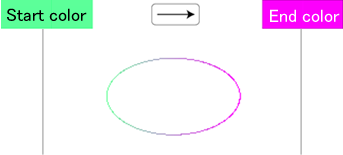 |
Line color1 | Specify the line color. Specify the line color if you have selected Hatching in Line color pattern. Specify the start color of the gradation if you have selected Gradation2 in Line color pattern. |
Line color2 | Specify the tile line color if you have selected Hatching in Line color pattern. Specify the end color of the gradation if you have selected Gradation2 in Line color pattern. |
Attribute-formula | Specify an attribute-formula. |