Remove an item from the subform layer in hierarchy tree
You cannot place an item outside the subform area if it is under the subform hierarchy. To move such an item out of the subform area, you must remove the item from under the subform in the hierarchy tree in Navigator and then move it to the same hierarchical level as the subform.
Procedure
Select the Hierarchy tab in Navigator.
A hierarchy tree is displayed.
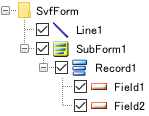
In the hierarchy tree, select an item you want to move to the outside of the subform area. Drag and drop it onto "SvfForm" located at one level higher than the subform hierarchy.
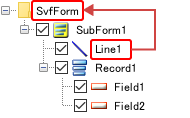
The selected item is removed from the subform hierarchy and then placed at the same hierarchical level as the subform.
Reference
You can also remove an item from the subform hierarchy by selecting the item you want to place outside of the subform and then selecting Move between SVF hierarchies - Move to main(SvfForm) from the right-click menu of the item. If you select Move to (<item_name>), the item is moved to be placed under the target item hierarchy.
The items removed from the subform hierarchy in the hierarchy tree can be moved to the outside of the subform area on the form window.