"Format" - "Batch setting of items" setting items
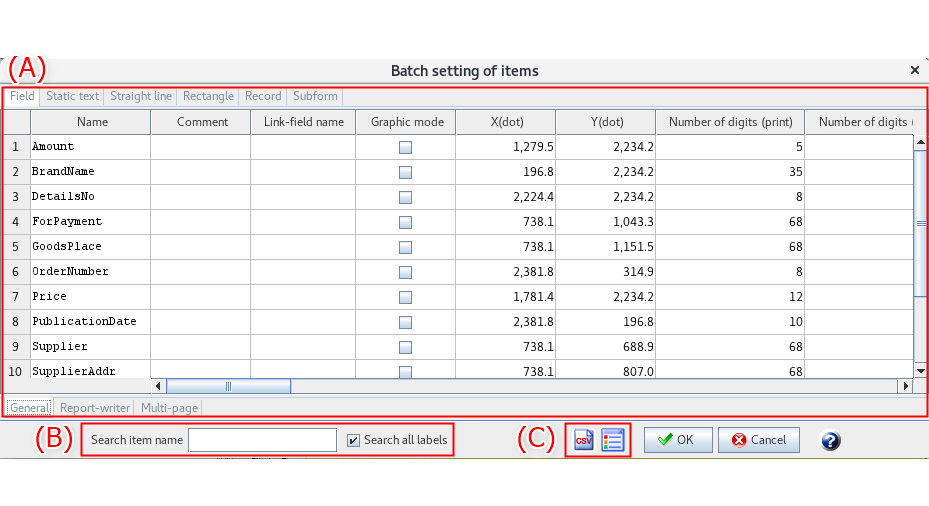
On the Batch setting of items dialog, you to set properties of all items on a form individually or collectively.
Area | Description |
|---|---|
(A) | Items on a form are displayed by type. Select one or more items and set properties. The items displayed in the Batch setting of items dialog are set in Settings - Preferences - Batch setting. |
(B) | Search for a specific item by its name. For details, see "Search for items". |
(C) | You can do the following operations. For details, see "Various icons".
|
Search for items
Item | Description |
|---|---|
Search item name | Enter the name of an item want to search for. Partial names are accepted. Press Enter key and the search item will be highlighted if it is found. |
Search all labels | Select this item to search all items regardless of item type. To search within items in the currently opened tab, clear the check box. |
Various icons
Icon | Description |
|---|---|
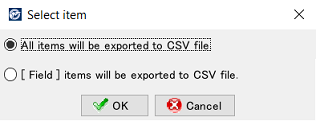
 | Outputs the current properties settings to a CSV file, either for all items or by specific item type. When you select an output target in the Select item dialog that is displayed when you click, the selected output target is output to a CSV file. CSV files are output to the work folder in the See ""Select item" dialog (for CSV file)" for details of the "Select item" dialog. See "CSV file output example" for an output example of CSV file. |
 | Changes the property items displayed in the Batch setting of items dialog. A list of properties of the currently selected item appears in the Display item dialog that is displayed when you click. You can show/hide property items by selecting/clearing the check boxes. |

"Select item" dialog (for CSV file)
Item | Description |
|---|---|
All items will be exported to CSV file. | Regardless of the currently selected item type, property information for all items will be output to a CSV file. |
<field> items will be exported to CSV file. | Property information only for items in the currently displayed tab will be output to a CSV file. |
CSV file output example
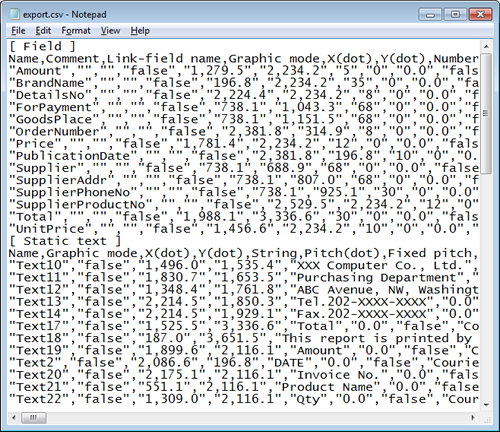
In the CSV file, output setting details are grouped by item type.
Reference
A column is added to the resulting file for outputting the parent item names.