4-14-1 Display the form specified in revision history on the Form Editor
The following procedure will display forms specified from the revision history as layers on the design form being edited:
Click the
 Compare form button on the left toolbar.
In the Compare form window, select a form definition to compare from the revision history list.
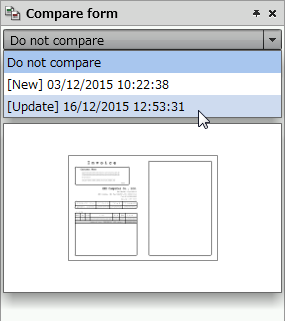
Specify a form definition to compare by selecting a date and time from the revision history list
To obtain the latest revision history list, click the Reload button.
Reference
In the revision history list, form definitions appear in the following format:
Display format
Display example
[Type] Date saved
[Update] 09/05/2013 14:20:53
The default value for the revision history list is "Do not compare".
To cancel the form comparison, select "Do not compare".
The form definition of selected date and time is displayed on the Revision history tab as a thumbnail.
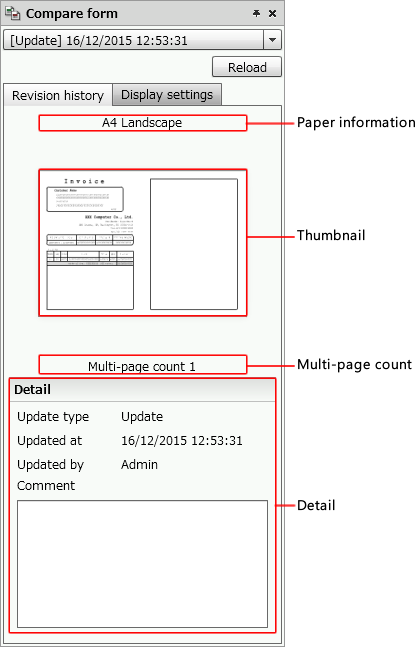
The selected version of the form definition appears as a thumbnail
Item
Description
Paper information
The paper information appears.
The display style changes as follows, depending on whether the paper size is standard or not:
Standard (postcard, A4, and so on)
The display format is "<paper_size> <orientation>".
E.g. A4 Portrait
Non-standard (stock form, free)
The display format is "<paper_size> (width x height)".
E.g. Free (210 x 297)
Thumbnail
The form definition corresponding to the selected date and time appears on the tab as a thumbnail.
Multiple-page count
The multi-page count of the form definition corresponding to the selected date and time appears on the tab.
Detail
The details of the form definition corresponding to the selected date and time appear on the tab.
Update type
Displays the type of the form definition corresponding to the selected date and time on the tab.
Newly created form definitions are displayed as New.
Updated form definitions are displayed as Update.
Form definitions restored by using the Form definition revision history dialog is displayed as Restore.
For details on restoring form definitions, see "3-4-4 Restore a form definition".
Updated at
Displays the date and time of the selected form definition.
Updated by
Displays the account name of a user who updated the selected form definition.
Comment
Displays the comments specified in the selected form definition.
Caution
When you select a form definition where child forms are embedded from the revision history list, the child forms do not appear in the thumbnail.
In the thumbnails displayed in the form definition list of the Explorer, the settings specified in the Compare form dialog are not displayed.
When you select a form definition that contains form images from the revision history list, the form images do not appear in the thumbnail.