
SVF Cloud for Salesforce

Classification

Restrictions

Developer Edition organizations

Procedure features are not available for Developer Edition organizations.

Salesforce users

Salesforce users using SVF Cloud for Salesforce must meet the following conditions.

  • User name

    Meets the restrictions for Salesforce and uses only half-width alphanumeric characters (0x20 to 0x7f in ASCII code).

  • First name, last name

    Uses only characters of 3 bytes or less in UTF-8.

Salesforce's "High Assurance" security setting

The following restrictions apply to users whose Profile - Session Security Level Required at Login specifies "High Assurance".

  • An error occurs when the preview screen is displayed with "OAuth" set for Environment Settings - Salesforce - Salesforce Connection Information - Application Authentication in SVF Cloud Manager.

  • When a Salesforce user with "High Assurance" is specified as a parameter for calling a procedure, execution of the procedure will fail.

Log activity history

The history of the form output is not recorded in the Activity History of the record.

Display language

The supported display languages in Salesforce are Japanese and English.

"Date/Time" type data

When outputting "Date/Time" type data to a form layout created with SVF Cloud Designer, it is output in the format of "yyyy-mm-ddThh:mm:ss.+hhmm".

Custom fields

When outputting the values of custom fields, the following restrictions apply.

  • The format set in the rich text area will not be saved.

  • Multiple selection lists are output with each value being separated by semicolons (;).

Supported objects

The following objects are supported among the Salesforce objects that can create print buttons:

  • Task

  • Campaign

  • Case

  • Lead

  • Account

  • Contact

  • Product

  • Opportunity

  • Contract

  • Order

  • Event

  • Quote

Object range

The following figure describes the range of Salesforce objects from which you can output data to a form, based on the object where you create the print button (Base object (1)).
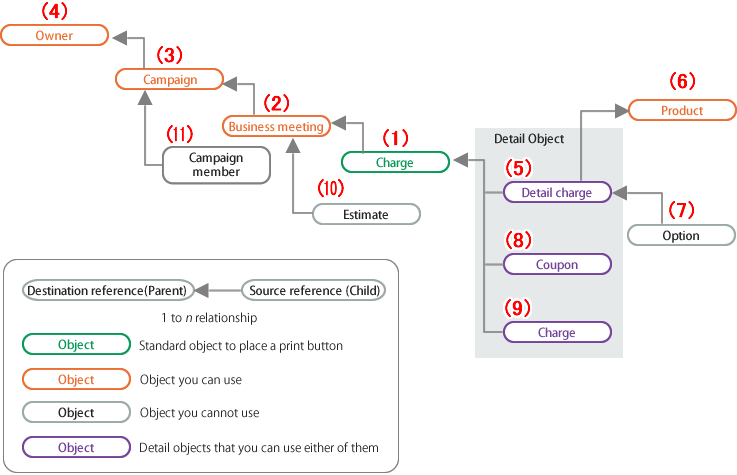
  • You can output "Referenced objects (2), (3), (4)" that are four layers ahead of "Base object (1)".

    • However, you cannot output another "Child objects (10), (11)" which refer to "Referenced objects (2), (3), (4)".

  • You can output any one of "Child objects (5), (8), (9)" that refer to "Base object (1)", as "[Detail Object]".

  • You can output another "Parent object (6)" that is referred to by "Child object (5)".

    • However, you cannot output "Grandchild objects (7)" that refers to "Child object (5)".

illust_sfdcObject.png